What is the best alternative to a traditional after-hours answering service?
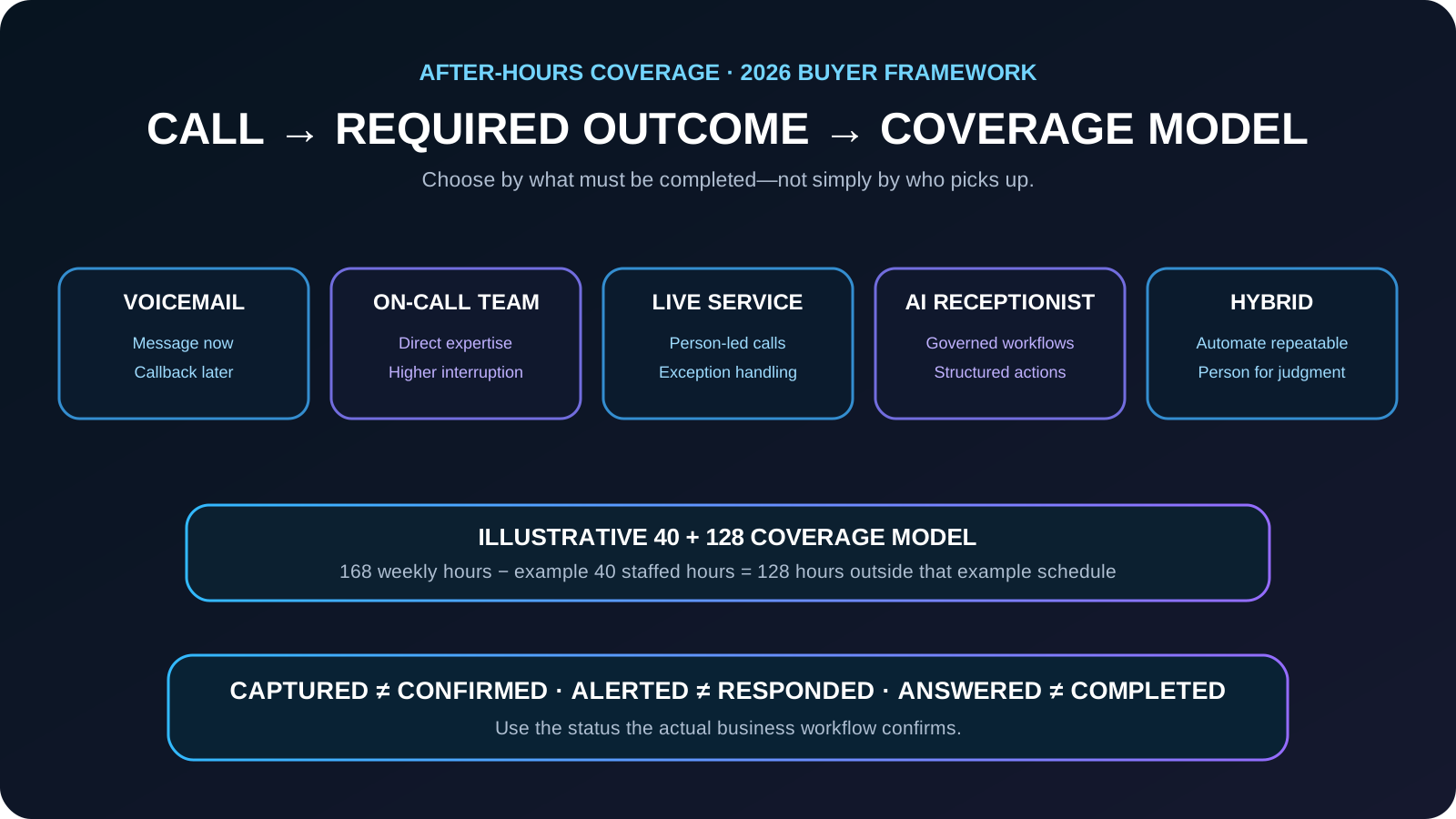
The best after-hours answering-service alternative depends on what callers actually need after closing. Voicemail can be appropriate when call volume and urgency are low and a next-business-day callback is acceptable. An on-call team member offers direct expertise but creates interruptions. A live answering service adds person-led conversation and exception handling. An AI receptionist can handle configured, repeatable workflows such as approved questions, structured intake, appointment requests, confirmations, and policy-based escalation, subject to provider, capacity, and technical limits. A hybrid model combines automation with a person for judgment-heavy, urgent, or uncertain situations. Compare the options by completed caller outcomes, escalation accuracy, staff interruption, system integration, and total operating cost—not by whether a call was merely answered.
What matters most
- Choose after-hours coverage by the caller outcome that must be completed, not just by who answers the phone.
- Voicemail, on-call staff, live answering, AI, and hybrid coverage can all be appropriate depending on urgency, workflow depth, and judgment required.
- Use the 40 + 128 model only as an illustrative 40-hour schedule example; actual staffed hours vary.
- Separate request captured, appointment confirmed, urgent classification, on-call notification, person response, and completed service.
- Do not promise continuous uptime, unlimited capacity, response time, appointment availability, or emergency service unless those facts are actually supported.
- Measure completed outcomes, escalation accuracy, unresolved calls, staff interruption, integration success, and total operating cost.
After-Hours Answering Service Alternatives: AI, Live Agents, Voicemail & Hybrid (2026)
After-hours coverage is not one problem. A caller may need to leave a routine message, get approved business information, request an appointment, report a policy-defined urgent condition, or reach a person. The right coverage model depends on which of those outcomes the business must complete.
That is why voicemail, an on-call employee, a live answering service, an AI receptionist, and a hybrid workflow can all be reasonable choices. The useful comparison is not AI versus people. It is which operating model completes the required work with truthful status language and an appropriate exception path.
Coverage hours and completed outcomes are also different measures. A system may be configured to receive calls around the clock, but that does not by itself guarantee provider uptime, unlimited concurrent capacity, a confirmed appointment, an on-call response, or completion of every request.
Start with the after-hours outcome the caller needs
Choose coverage after defining what callers must be able to accomplish outside normal hours. A low-cost message-taking solution can be sufficient for one business and inadequate for another.
- Message only: capture name, callback number, and reason for the call for later review.
- Approved information: provide current hours, locations, policies, service-area facts, or other configured information.
- Structured request: capture a lead, service request, reservation request, or appointment request with the fields the team needs.
- System action: use an authorized scheduling, CRM, notification, or follow-up workflow when the connection and business rules support it.
- On-call escalation: alert or transfer only when explicit business-owned qualifying conditions are met.
- Person requested or uncertainty detected: provide the configured person, callback, or escalation path instead of improvising.
The question is not only “Who answers?” It is “What must be completed before the business opens again?”
Use the 40 + 128 coverage model as an illustrative planning example
A week contains 168 hours. In an illustrative schedule with 40 staffed hours, 128 hours remain outside that staffed window. This is not an assumption about every receptionist or every business; actual staffed hours vary.
The planning question is: what covers the hours outside the team’s staffed schedule, and what outcomes are permitted during those hours? The answer may be voicemail, an on-call rotation, a live service, AI, or a hybrid.
- Map the business’s actual staffed schedule instead of assuming a standard workweek.
- Separate overnight, weekend, holiday, and overflow requirements when their rules differ.
- Define which outcomes can wait until the next staffed period.
- Define which outcomes can be completed automatically under approved rules.
- Define which conditions justify interrupting an on-call person.
168 total weekly hours − illustrative 40 staffed hours = 128 hours outside that example schedule.
Define after-hours intents before defining urgency
- New sales, estimate, or service inquiry
- Existing-customer support request
- Policy-defined urgent or emergency-related statement
- Appointment, reservation, or callback request
- Status, hours, location, or approved policy question
- Billing, account, warranty, or records message
- Vendor, applicant, solicitation, spam, or wrong number
- Caller asking for a person or presenting an exception the workflow cannot resolve
Create an urgency and on-call policy the system can actually follow
Do not treat the caller simply using the word “emergency” as proof that the business has accepted an emergency job or that an on-call person is responding. The business should define the qualifying facts, approved safety or emergency-services language, contact sequence, attempt limits, and fallback when nobody responds.
- Write qualifying conditions and exclusions in plain language.
- Define the approved safety or emergency-services statement for applicable situations.
- Collect only the facts required by the on-call person.
- Define who is contacted, in what order, and how many attempts are allowed.
- State whether the caller has only been classified, whether an alert was sent, or whether a person actually accepted the handoff.
- Record the escalation and review false positives, missed escalations, and unresolved cases.
URGENT CLASSIFICATION ≠ ON-CALL NOTIFIED ≠ PERSON RESPONDED ≠ SERVICE CONFIRMED.
Give non-urgent callers a complete and truthful next step
A routine after-hours caller should know what happened to the request and what happens next. Avoid invented response windows or confirmation language.
- Request captured: the business has a structured request, but no appointment or service time is implied.
- Appointment requested: the requested time is recorded but not necessarily available or confirmed.
- Appointment confirmed: use only when the authorized scheduling system actually confirms it.
- Message queued for the next staffed period: use only when that is the configured workflow.
- Confirmation sent: means the message or request receipt was confirmed, not that the underlying service outcome was approved.
- Callback timing: state a response window only when the business has actually defined and supports that expectation.
REQUEST CAPTURED ≠ APPOINTMENT CONFIRMED ≠ ON-CALL RESPONSE ≠ SERVICE COMPLETED.
Compare voicemail, on-call staff, live answering, AI, and hybrid coverage
| Option | Best fit | Tradeoff to test |
|---|---|---|
| Voicemail | Low-volume, low-urgency calls where delayed callback is acceptable | The caller cannot complete much beyond leaving a message. |
| On-call team member | Judgment-heavy or specialized calls that justify direct expertise | Interruptions, fatigue, and inconsistent intake can become operational costs. |
| Live answering service | Person-led conversation, reassurance, and exception handling | Test account knowledge, workflow depth, handoffs, usage pricing, and peak-hour capacity. |
| AI receptionist | Configured repeatable questions, intake, requests, system actions, and rule-based routing | Requires governed rules, tested integrations, truthful status language, and an exception path. |
| Hybrid | Repeatable work plus person-led judgment for exceptions | Requires clear ownership so callers and staff know when automation ends and a person takes over. |
No option is universally best. Match the coverage model to the work that must be completed and the exceptions that require judgment.
Launch and verify the after-hours workflow
- After-hours greeting and disclosure approved
- Normal hours, holidays, and schedule boundaries correct
- Voicemail, live, AI, on-call, or hybrid ownership documented
- Urgency rules and person-request rules tested
- On-call contacts, contact order, and fallback tested
- Appointment request versus confirmation language tested
- Callback and response-time language matches actual operations
- Lead, message, CRM, scheduling, or follow-up destinations verified
- Provider, capacity, and technical failure fallback documented
- Weekly review covers unresolved calls, false escalations, missed escalations, and staff interruptions
Verify the full outcome chain. A successful phone pickup is not enough if the request is lost, mislabeled, or promised more than the business actually confirmed.
Example: one after-hours line, three different outcomes
One caller wants a next-day appointment, another describes a condition that matches the business’s written on-call rule, and a third only needs approved business information.
The after-hours workflow records the appointment as requested unless scheduling actually confirms it, applies the business-owned on-call criteria without promising service, and answers the routine information request from approved data. If an exception or uncertainty appears, it uses the configured person path.
Each caller receives the appropriate next step without treating every call as an emergency or claiming an appointment, response, or service outcome that has not actually been confirmed.
Frequently asked questions
Can an AI receptionist answer after-hours calls 24 hours a day?
It can be configured for continuous coverage, subject to provider availability, configured capacity, integrations, and technical limits. That is different from guaranteeing that every call or every requested outcome will always complete.
Should after-hours appointments be automatically confirmed?
Only when an authorized scheduling workflow actually returns confirmed availability under the business’s rules. Otherwise, capture a pending request and clearly tell the caller that confirmation is still required.
Is voicemail still a good after-hours answering option?
Yes. Voicemail can be a sensible choice when after-hours volume and urgency are low, callers only need to leave a message, and next-business-day follow-up is acceptable. It becomes less suitable when callers need real-time information, structured intake, scheduling, routing, or urgent escalation.
Is an AI receptionist better than a live answering service after hours?
Not universally. AI is well suited to governed, repeatable workflows and structured system actions. A live service can be stronger when the call requires improvisation, reassurance, or judgment. A hybrid model can use automation for repeatable work and a person for exceptions.
How can a business prevent unnecessary on-call interruptions?
Define explicit qualifying conditions, collect the required facts before escalation, set the contact sequence and fallback, distinguish an alert from an accepted response, and review escalation outcomes so the policy can be improved.
How to verify this answer in your own business
Evaluate after-hours coverage by whether callers reach the correct completed next step without increasing unsupported promises, missed escalations, or unnecessary on-call interruption.
- after-hours calls receiving an appropriate next step
- complete request and lead records
- appointment request versus confirmation accuracy
- urgent classification and escalation accuracy
- on-call alert and accepted-response rates
- unresolved or abandoned calls
- staff interruption volume
- provider or integration failures
- total operating cost per verified completed outcome
Test routine information, voicemail-only, new lead, appointment request, unavailable time, caller requesting a person, policy-defined urgent condition, false emergency wording, no on-call response, holiday schedule, provider or integration failure, and next-business-day callback workflows. Confirm the resulting records and caller language match the business’s actual state.
Evidence policy: this page does not invent a universal conversion rate. Results depend on call demand, workflow quality, staff response, and implementation.
See how AEOS connects customer conversations to business actions.
Explore AEOS by Orca Charts for AI receptionist, scheduling, CRM, follow-up, business Q&A, live transfers, and team workflows for Owner Guides.