What Can an AI Receptionist Do for a Small Business in 2026?
An AI receptionist for a small business can answer calls, identify intent, answer approved business questions, capture leads, schedule or request appointments, route or transfer callers, update CRM records, and trigger configured follow-up. It is strongest on repetitive, rules-based workflows and should hand judgment-heavy, sensitive, or unverified situations to a person. A practical first use is overflow, after-hours coverage, or one high-volume call type with a clearly defined next action and owner.
What matters most
- An AI receptionist should connect a caller to a next business action, not stop at answering the phone.
- Small businesses can use AI for approved Q&A, lead capture, scheduling, transfers, CRM records, follow-up, overflow, and after-hours workflows.
- People should remain responsible for judgment-heavy, sensitive, unverified, and exception-driven situations.
- A hybrid model can keep the existing team first while AI removes repetitive interruption and coverage gaps.
- Start with one or two measurable workflows and expand only after the handoff and outcome quality are verified.
- Measure completed next steps, owner assignment, unresolved requests, and customer outcomes rather than answer rate alone.
AI Receptionist for Small Business: 8 Things It Can Do (2026)
An AI receptionist is most useful when it is treated as an operating workflow, not a talking novelty. The voice is only the front door. The value comes from what happens next: the caller’s intent is captured, the lead is qualified, the appointment is requested, the urgent call is routed, the follow-up is created, and the record reaches the right person.
A small business does not need to automate every call. Start with the repeatable work that creates the most missed opportunities or staff interruption, define what the system may do, and keep a clear path to a team member for judgment, exceptions, and sensitive situations.
The strongest operating model is often hybrid: people stay responsible for relationships and judgment while AI handles approved repetitive execution, overflow, after-hours coverage, and structured handoffs.
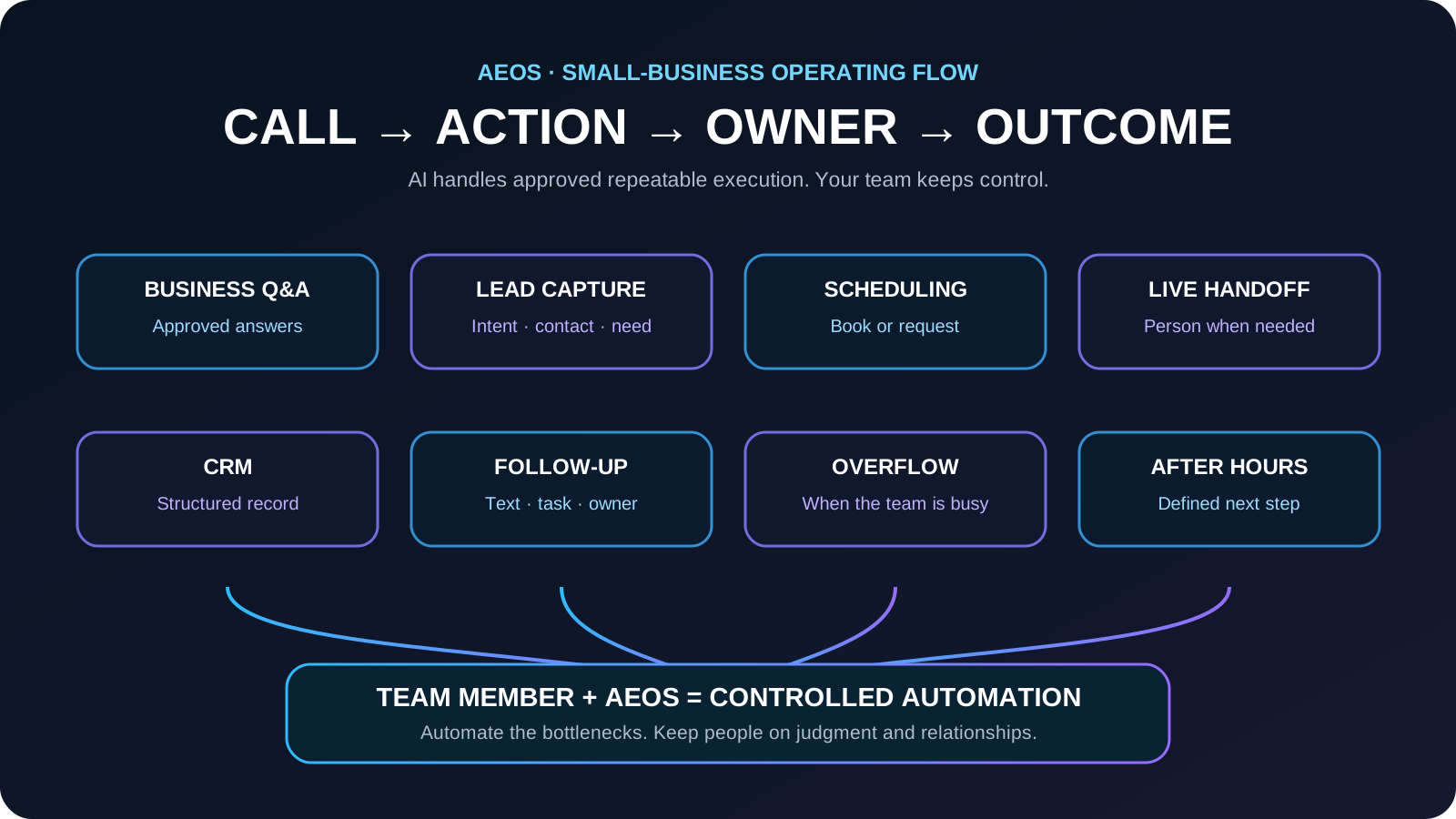
From customer call to business outcome: what an AI receptionist can actually do
The useful question is not whether AI can answer a phone. It is whether the conversation reliably moves into the next business action. A configured workflow can connect the initial call to scheduling, a transfer, a CRM record, follow-up, or a team-owned task.
- Answer and identify intent: determine what the caller is trying to accomplish before collecting unnecessary information.
- Business Q&A: answer approved questions about hours, service areas, availability, policies, and other verified business information.
- Lead capture: collect the name, contact details, service need, location, urgency, and qualification fields the business actually uses.
- Scheduling: book when the workflow is authorized and connected, or create a clearly pending appointment request when confirmation still belongs to the team.
- Live handoff: transfer or route callers to a person when the business rules require human judgment or the caller requests one.
- CRM: create or update a structured customer record so the conversation does not disappear after the call ends.
- Follow-up: send configured texts or create team follow-up work when the customer still needs a response.
- Overflow and after-hours: give callers a defined next step when the normal team is busy or unavailable.
The useful unit is not an answered call. It is an answered call that reaches a clear next action, owner, and outcome.
Choose the operating model: team first, AI first, or hybrid
The right setup depends on the work. A business with a strong front desk may use AI only for overflow and after-hours coverage. A field-service company may use AI as the first response for routine calls while sending exceptions to the owner or dispatcher. Another business may keep people first during staffed hours and use AI only when capacity runs out.
- Team first: people answer normally; AI handles busy, unanswered, simultaneous, or after-hours calls.
- AI first for defined workflows: repetitive calls enter a structured intake path and transfer when a person is needed.
- Hybrid: keep people on judgment, relationships, and exceptions while AI handles approved repeatable execution.
- Start narrow: prove one or two high-volume workflows before expanding authority.
Do not automate work merely because it can be automated. Automate the repeatable bottlenecks and keep people in control of the exceptions.
Common small-business workflows
- Answer after-hours and overflow calls
- Capture name, phone, service need, location, and urgency
- Answer approved questions about hours, service areas, and availability
- Book appointments or submit appointment requests
- Transfer urgent calls to an on-call person
- Send confirmation and follow-up text messages
- Create a lead record and notify the owner or team
- Separate customers, vendors, applicants, and sales calls
Where guardrails matter
An AI receptionist should not invent pricing, promise unavailable times, give regulated advice, or make commitments outside the business rules. The system needs approved knowledge, clear refusal language, escalation triggers, and a fallback when the conversation cannot be completed safely.
- Use approved answers rather than open-ended guessing
- Define what the agent may book, quote, refund, or promise
- Require confirmation before high-impact actions
- Escalate emergencies and sensitive conversations
- Keep an audit trail of calls, summaries, and actions
- Review failures and update the workflow
A practical first launch
- Pick the call type that creates the most missed revenue or staff interruption.
- Write the minimum information needed to complete that call.
- Define business hours, service areas, disqualifiers, and urgent conditions.
- Connect the result to one destination, such as a calendar request or CRM queue.
- Test normal callers, distracted callers, interruptions, wrong numbers, and requests for a person.
- Launch to a controlled portion of calls and review outcomes daily.
- Expand only after the first workflow consistently produces complete records.
What the owner still controls
The business remains responsible for its policies, offers, schedules, escalation contacts, and customer promises. An AI receptionist can execute those rules quickly, but it should not become an unowned black box. Assign one person to approve changes and review exceptions.
The best system makes ownership clearer, not weaker: every automated action should have a rule, an owner, and a record.
How to judge whether it is working
- Percentage of calls answered
- Percentage of leads with complete contact information
- Qualified appointments or requests created
- Correct urgent-call escalations
- Caller drop-off before completion
- Staff time saved on repetitive calls
- Revenue or opportunities connected to handled calls
- Error rate and time to correct errors
Example: a new customer estimate request
A customer asks whether the business serves their area and can provide an estimate this week.
The AI confirms the service type, address, preferred timing, contact information, and required qualification details. It answers only approved business questions, then creates the configured next step such as an appointment request, CRM opportunity, transfer, or follow-up task instead of leaving an unstructured voicemail.
The caller receives a clear next step while the owner or team receives a structured opportunity with the information and ownership needed to continue the work.
Frequently asked questions
Can an AI receptionist use my existing business number?
Often, yes. Common approaches include forwarding unanswered calls, routing selected call types, or connecting the number through a supported phone provider.
Can it schedule appointments?
Yes, when connected to a calendar or scheduling system and given clear rules about availability, duration, buffers, services, and approval.
Does it replace every receptionist task?
No. It is strongest at repeatable phone workflows. Complex judgment, sensitive issues, and broad administrative work may still require a person.
Can an AI receptionist work alongside my existing staff?
Yes. A common setup keeps the team as the primary path while AI handles approved overflow, after-hours calls, repetitive questions, structured intake, scheduling requests, and follow-up. Calls that need judgment or a person can be transferred or handed back with context.
What should a small business automate first with an AI receptionist?
Start with the call type that creates the most missed opportunities or repetitive interruption and has a clear next step. Common first workflows are unanswered-call overflow, after-hours intake, lead capture, appointment requests, and routine business questions.
How to verify this answer in your own business
The useful evidence is whether the receptionist moves real calls through the approved workflow accurately: intent captured, required fields complete, next action created, owner assigned, handoff correct, and outcome visible.
- answered-call rate
- field completion
- qualified lead rate
- appointments requested or booked
- handoff accuracy
- staff follow-up time
Compare a baseline period with a controlled pilot. Audit representative normal calls, missed-call overflow, after-hours calls, appointment requests, transfers, follow-up items, and exceptions. Verify the resulting CRM or scheduling record and whether a team member can continue the work without asking the customer to start over.
Evidence policy: this page does not invent a universal conversion rate. Results depend on call demand, workflow quality, staff response, and implementation.
See how AEOS connects customer conversations to business actions.
Explore AEOS by Orca Charts for AI receptionist, scheduling, CRM, follow-up, business Q&A, live transfers, and team workflows for Owner Guides.