How can an AI receptionist help a dental office with calls, scheduling, and patient follow-up?
A dental AI receptionist can handle approved administrative workflows such as new-patient intake, appointment requests, rescheduling, cancellations, office information, insurance questions, overflow, after-hours intake, and administrative follow-up. It should identify whether the caller is new or existing when that changes the workflow, collect only the information required for the approved task, distinguish confirmed appointments from pending requests, and hand clinical, sensitive, or unverified situations to qualified staff. The dental team remains in control of scheduling rules, privacy boundaries, escalation, exceptions, and clinical judgment.
What matters most
- Use AI for controlled dental administrative workflows, not diagnosis, treatment advice, or clinical judgment.
- Route new-patient, existing-patient, scheduling, insurance, after-hours, and escalation calls through different approved paths.
- Confirm appointments only when the practice has authorized and tested the scheduling workflow; otherwise create a clearly pending request.
- Treat Open Dental or any other practice-management integration as real only after the exact connection and action are configured and verified.
- Use overflow and after-hours coverage to protect the front desk from repetitive interruption without removing the team from the patient relationship.
- Preserve office, owner, status, and follow-up through the entire handoff, especially for multi-location practices.
- Measure completed next steps, handoff accuracy, unresolved requests, and staff correction time rather than answer rate alone.
AI Receptionist for Dental Offices: Calls, Scheduling & Patient Follow-Up (2026)
A dental office does not need AI to act like a dentist. It needs a reliable administrative first-response layer for the phone work that repeatedly interrupts the front desk: new-patient calls, appointment requests, rescheduling, office questions, insurance questions, after-hours messages, overflow, and requests that need the right team member.
The safest and most useful design routes each caller by intent. AI handles approved administrative steps, while clinical questions, sensitive situations, policy exceptions, and anything the system cannot verify move to the practice’s qualified human workflow.
The result should be operationally clear: the patient knows what is confirmed, what is pending, and what happens next; the dental team receives a structured record with the correct owner, location, and follow-up path.
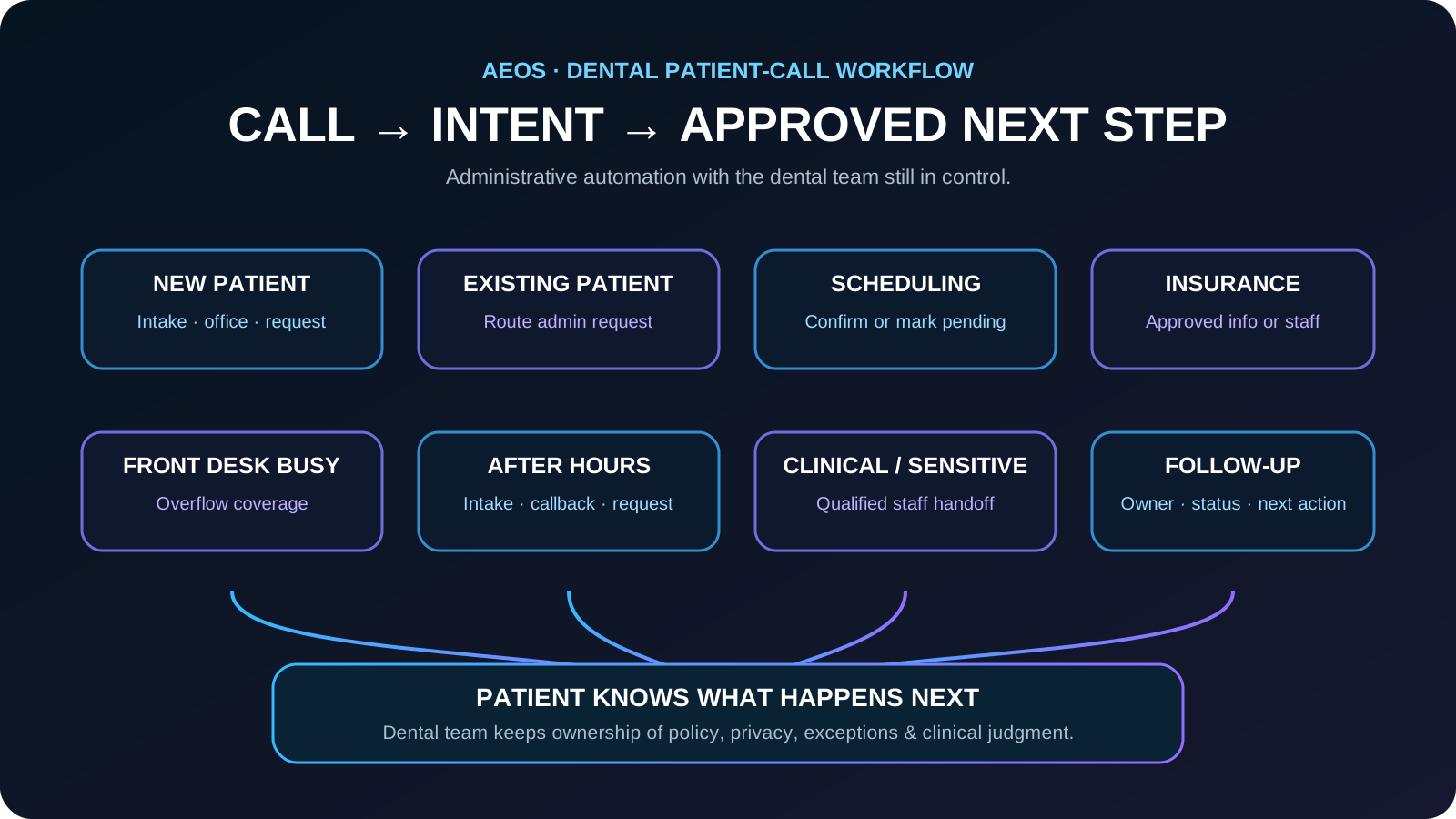
Dental call map: route each patient to the right next step
A dental receptionist workflow becomes easier to manage when the first decision is the caller’s intent. New patients, existing patients, appointment changes, insurance questions, after-hours requests, and clinical or sensitive situations should not all follow the same script.
- New patient → capture approved intake, service interest, preferred office, appointment preference, and contact details.
- Existing patient → identify the administrative request and route rescheduling, billing, records, office information, or other approved needs to the correct workflow.
- Appointment request → use approved scheduling rules; confirm only when the practice has authorized and tested direct booking, otherwise create a clearly pending request.
- Insurance question → answer only from practice-approved information and send plan-specific verification to staff when it cannot be confirmed safely.
- Front desk already busy → use overflow coverage so the patient receives a useful next step without interrupting the conversation already in progress.
- After hours → capture the administrative request, create the correct appointment or callback work, and use only the practice’s approved escalation language.
- Clinical, sensitive, or unverified request → stop the routine administrative flow and hand the caller to the qualified staff path.
- No immediate completion → create a structured CRM, scheduling, callback, or staff-review item with the correct location, owner, and status.
The goal is not to automate the dental team. It is to keep routine administrative calls moving while the team keeps ownership of patients, policy, privacy, exceptions, and clinical judgment.
What a dental AI receptionist can handle
The strongest first workflows are repetitive administrative calls with a clear next step. The goal is not to automate every conversation; it is to stop routine phone demand from becoming missed calls, incomplete voicemail, or constant interruption.
- New-patient inquiries and basic office information
- Appointment requests and approved scheduling workflows
- Rescheduling and cancellation requests
- Hours, location, parking, and other approved practice information
- Insurance questions that can be answered from approved information or routed for staff follow-up
- After-hours administrative intake
- Message routing to the correct team or location
- Overflow calls when the front desk is already helping patients
- Structured callback requests when a human answer is required
Separate new-patient calls from existing-patient calls
New and existing patients often need different workflows. A new-patient call may focus on location, service interest, appointment preference, insurance category, and contact information. An existing-patient call may involve a reschedule, billing question, records request, treatment-related question, or another matter that should be routed according to the practice's rules.
The AI should establish which path applies early so it does not collect unnecessary information or send the caller through the wrong workflow.
- Ask whether the caller is a new or existing patient when that distinction changes the workflow.
- Collect only the fields required for the approved intent.
- Do not ask the same intake questions after the caller has already provided the information.
- Route clinical, billing, records, and other specialized requests to the correct staff process.
Appointment requests, rescheduling, and cancellations need different rules
Scheduling is not one generic action. A practice may allow direct booking for some appointment types, require approval for others, limit certain providers or locations, and use different rules for new patients, follow-ups, procedures, or urgent requests.
If the system is not authorized to confirm an appointment, it should clearly describe the request as pending rather than presenting an unconfirmed time as booked.
- Confirm the preferred office or location when the practice has more than one.
- Collect preferred date and time windows rather than inventing availability.
- Use only schedule information exposed by an approved integration or workflow.
- Distinguish confirmed appointments from requests awaiting staff review.
- Repeat the next step so the patient knows whether anything is actually confirmed.
A clean pending request is safer than a confident appointment promise the practice never approved.
How to handle insurance questions without overpromising
Insurance questions are common and easy to mishandle. The receptionist should answer only from information the practice has approved for that workflow. If coverage, network status, benefits, or patient responsibility cannot be confirmed safely, the system should capture the question and route it for the practice's normal verification process.
The caller should be told whether the system is providing general office information or whether staff still need to verify the specific plan or benefit.
- Capture the insurer or plan category only when the practice needs it.
- Do not guarantee coverage, benefits, reimbursement, or final patient cost.
- Use approved office language for plans the practice commonly handles.
- Create a staff follow-up when verification is required.
Open Dental and other practice-management systems: verify the integration first
A dental AI receptionist should not claim that it can read or change an Open Dental schedule, patient record, or any other practice-management system unless that exact integration has been configured and tested for the practice.
When no approved integration exists, the safe fallback is still useful: capture a structured appointment or callback request, identify the correct location or team, and place the work in the practice's normal review queue.
Integration claims should describe what is actually connected and tested, not what the software could theoretically do.
Central call management for multi-location dental groups
Multi-location practices add routing problems that a generic script misses. The receptionist needs to know which office the patient wants, which locations handle the requested service, which team owns the follow-up, and whether the request can move between locations.
A centralized AI layer can collect the same core intake across locations while applying location-specific hours, routing, and scheduling rules. The handoff record should preserve the chosen office so staff do not have to ask the patient to start over.
- Identify preferred or existing office early in the conversation.
- Use location-specific hours and approved services.
- Route requests to the correct front desk, centralized team, or callback queue.
- Keep the selected location attached to the appointment or message record.
- Escalate cross-location exceptions instead of guessing which office can accept them.
After-hours and missed-call recovery should create a real next step
Dental calls do not stop when the front desk is busy or the office closes. After-hours coverage should distinguish routine administrative requests from statements that match the practice's written urgent-clinical escalation policy.
For routine calls, the AI can collect the approved information, explain when the office will follow up, and create a structured record. For anything outside that workflow, it should use the practice's approved escalation or emergency language rather than improvising.
- Create a callback or appointment-request record instead of an unstructured voicemail.
- Record whether the caller is new or existing when relevant.
- Preserve the reason for the call in non-diagnostic language.
- Set the correct owner, queue, or location for follow-up.
- Do not give diagnosis, treatment, medication, or unapproved emergency instructions.
Privacy and identity rules belong inside the workflow
A dental office may handle sensitive patient information. The AI workflow should therefore follow the practice's approved identity, privacy, retention, access, and handoff rules instead of collecting every detail simply because a caller is willing to provide it.
The system should collect the minimum information the approved workflow actually needs, avoid exposing patient information to the wrong caller, and send sensitive requests to staff when the automation is not authorized to complete them.
- Use practice-approved identity checks for workflows that require them.
- Collect only information needed for the current administrative task.
- Avoid reading back sensitive details unless the workflow specifically permits it.
- Route records, billing, clinical, and other sensitive exceptions to staff.
- Keep human ownership of privacy-policy changes and exception review.
What the AI should immediately hand to a person
The AI should not make clinical judgments. If a caller asks for diagnosis or treatment advice, describes a situation covered by the practice's urgent-clinical escalation policy, requests a policy exception, or asks for something the system cannot verify, the workflow should stop trying to complete the routine script and move to the approved human path.
- Clinical questions or requests for treatment advice
- Medication or prescription questions
- Urgent clinical statements covered by the practice's escalation rules
- Complaints, disputes, or sensitive patient-experience issues
- Requests involving records or information outside the AI's approved authority
- Any caller who asks for a person when the practice's handoff policy requires one
- Any situation where the system cannot verify the answer or permitted next action
The AI's job is to recognize the boundary early and hand off cleanly, not to sound confident past its authority.
A practical dental call-to-outcome workflow
- Answer with the dental office's approved identity and greeting.
- Identify the caller's intent and whether they are new or existing when relevant.
- Collect only the required administrative information for that intent.
- Apply location, scheduling, privacy, and escalation rules.
- Complete the permitted administrative action or create a pending request.
- Transfer or route any clinical, sensitive, or unverified exception.
- Repeat what is confirmed, what is pending, and what happens next.
- Create a structured record with the correct owner or location.
- Track whether the request was actually completed.
Dental AI receptionist call example: new-patient appointment request
ClubFleet's separate Dental AI Receptionist Call Example focuses on one specific scenario: a new patient requests an appointment and asks about insurance. The workflow identifies whether the caller is new or existing, records the appointment reason in non-diagnostic terms, collects preferred office and timing, captures the insurance question for approved lookup or staff follow-up, and repeats the next step.
That demo should remain a focused proof of one workflow. This authority guide covers the broader operating model around scheduling, overflow, after-hours calls, central routing, privacy boundaries, and human escalation.
How to measure whether the dental workflow is helping
Answer rate alone is not enough. The useful question is whether the caller reached the correct next step and whether the dental team received a complete, actionable record.
- New-patient inquiries captured
- Appointment requests completed or correctly queued
- Reschedule and cancellation accuracy
- Missing intake fields
- Calls transferred or escalated correctly
- Caller requests for a person
- Time from call to staff follow-up
- Calls that require the patient to repeat information
- Unresolved requests or repeat calls
- Staff correction time after automated handling
Start with two or three high-volume dental workflows and prove the handoff quality before adding more.
Where AEOS fits in a dental office
AEOS is the operating layer behind the receptionist workflow: answering approved calls, capturing structured intake, applying routing rules, creating appointment or callback work, transferring exceptions, and preserving ownership through the CRM or scheduling process.
The intended model is controlled automation, not clinical substitution. The dental team defines the knowledge, schedule rules, privacy boundaries, escalation contacts, and human handoff policy. AEOS executes the approved administrative workflow and leaves clinical judgment with qualified people.
Example: a new patient asks for an appointment and insurance information
A new patient asks for an appointment at a specific dental office and wants to know whether the practice accepts their insurance plan.
The AI identifies the caller as a new patient, captures the request in non-diagnostic terms, collects the preferred office and timing, uses only approved insurance information, and creates either a confirmed appointment or a clearly pending request according to the practice’s configured rules. Any unverified or sensitive issue is routed to staff.
The patient leaves the call knowing what is confirmed, what is pending, and what happens next, while the dental team receives a structured record with the correct office and follow-up owner instead of an incomplete voicemail.
Dental patient-conversation knowledge graph
This map defines the customer language, required facts, approved workflow, intended outcomes, and guardrails AEOS should understand for this industry.
Common problems
- new-patient appointment
- rescheduling
- cancellation
- office information
- billing question
- records request
- urgent clinical statement
What callers say
- I need a cleaning
- I need to move my appointment
- Do you take my insurance?
- I have tooth pain
- Can you send my records?
Information to capture
- patient identity under approved policy
- callback number
- request type
- preferred date or time
- new or existing patient status
- approved administrative details
AI workflow
- identify administrative or clinical intent
- apply identity and privacy rules
- complete approved scheduling or message workflow
- route clinical statements
- send permitted confirmation
- log action
Business outcomes
- completed appointment request
- accurate reschedule request
- routed administrative message
- correct clinical escalation
Guardrails
- no diagnosis
- no treatment advice
- no medication advice
- minimum-necessary information
- qualified clinical escalation
Frequently asked questions
What can an AI receptionist do for a dental office?
It can handle approved administrative calls such as new-patient intake, office information, appointment requests, rescheduling, cancellations, after-hours messages, overflow, and structured staff routing. It should not diagnose, recommend treatment, or make decisions outside the practice's approved workflow.
Can an AI receptionist book dental appointments?
Yes, when the practice has given it approved scheduling rules and a tested way to access permitted availability. If direct booking is not authorized, it should collect the request and clearly tell the patient that the time is pending staff confirmation.
Can an AI receptionist work with Open Dental?
Only if the practice has a configured and tested integration or approved workflow for the specific action. Without that connection, the AI should capture a structured request for staff instead of claiming that it read or changed the Open Dental schedule or patient record.
How should a dental AI receptionist handle insurance questions?
It should answer only from practice-approved information, avoid guaranteeing benefits or patient cost, and route plan-specific verification to the practice's normal staff process when the answer cannot be confirmed safely.
What should happen when a dental caller needs clinical advice?
The AI should not provide diagnosis or treatment advice. It should follow the dental practice's written clinical-escalation and human-handoff policy, using only the approved language and next steps for that situation.
Can one AI receptionist handle calls for multiple dental locations?
It can support centralized call handling when each location's hours, services, routing, scheduling rules, and escalation paths are configured. The selected office should remain attached to the request so the patient does not have to repeat the conversation.
Can an AI receptionist follow up on dental appointment requests?
It can support approved administrative follow-up when the practice has defined the workflow, timing, contact rules, and what information may be sent. Follow-up should stay within administrative scope and should not include diagnosis, treatment advice, or unverified clinical information.
How should a dental office use AI when the front desk is already busy?
Use AI as an approved overflow layer. The front desk can remain the primary patient-facing team while AI handles routine questions, captures structured appointment or callback requests, and routes sensitive or clinical situations to the correct person.
How to verify this answer in your own business
Evaluate the dental workflow by whether patients reach the correct administrative next step, whether appointment status and office ownership remain accurate, whether sensitive and clinical calls are handed off safely, and whether the team receives a complete actionable record.
- new-patient intake completion
- appointment-request completion
- reschedule and cancellation accuracy
- insurance-question routing
- location-routing accuracy
- clinical escalation accuracy
- staff correction time
- patient repeat-information rate
- unresolved request rate
- time to staff follow-up
Test new-patient, existing-patient, appointment, reschedule, cancellation, insurance, overflow, multi-location, after-hours, ambiguous, and clinical-escalation scenarios against the practice’s own approved policies. Verify the resulting appointment status, office, owner, follow-up record, and human handoff rather than judging the system only by answer rate or how natural the voice sounds.
Evidence policy: this page does not invent a universal conversion rate. Results depend on call demand, workflow quality, staff response, and implementation.
See how AEOS connects customer conversations to business actions.
Explore AEOS by Orca Charts for AI receptionist, scheduling, CRM, follow-up, business Q&A, live transfers, and team workflows for Industry Guides.