How can an AI receptionist help an HVAC company handle customer calls?
An HVAC AI receptionist can handle approved administrative call workflows such as no-cooling or no-heat service requests, maintenance calls, replacement or estimate leads, scheduling requests, overflow, and after-hours intake. It can collect the caller’s contact information, service address, plain-language problem description, equipment type if known, timing, access notes, and business-approved urgency factors; then create the configured next step or hand the call to the correct person. It should not diagnose equipment, give unapproved technical or safety instructions, invent availability, promise an arrival time, or say a technician is dispatched unless the HVAC company has actually confirmed that status.
What matters most
- Separate no-cooling, no-heat, maintenance, estimate, existing-customer, after-hours, and safety-sensitive calls.
- Capture contact information, service address, problem description, timing, equipment type if known, access notes, and approved urgency factors.
- Use only the HVAC company’s configured service-area, scheduling, after-hours, and escalation rules.
- Distinguish requested, pending, scheduled, on-call alerted, and dispatched statuses.
- Do not diagnose equipment, give unapproved repair or safety advice, or invent technician availability.
- Measure complete service records, correct routing, staff correction time, and completed next steps.
AI Receptionist for HVAC Companies: Calls, Scheduling & After-Hours Coverage (2026)
HVAC phone demand is not one generic call type. A no-cooling request, maintenance call, replacement estimate, existing-customer question, after-hours request, and safety-sensitive statement each need a different administrative path.
The useful role of an AI receptionist is to handle the repeatable first layer: identify intent, collect the facts the HVAC company actually needs, apply approved service-area, scheduling, after-hours, and escalation rules, and create a structured record for the person or queue that owns the next step.
The status language matters. A service request can be captured, pending, scheduled, escalated, or sent to an on-call contact; those are not interchangeable. The AI should describe only the status the company’s configured workflow has actually established.
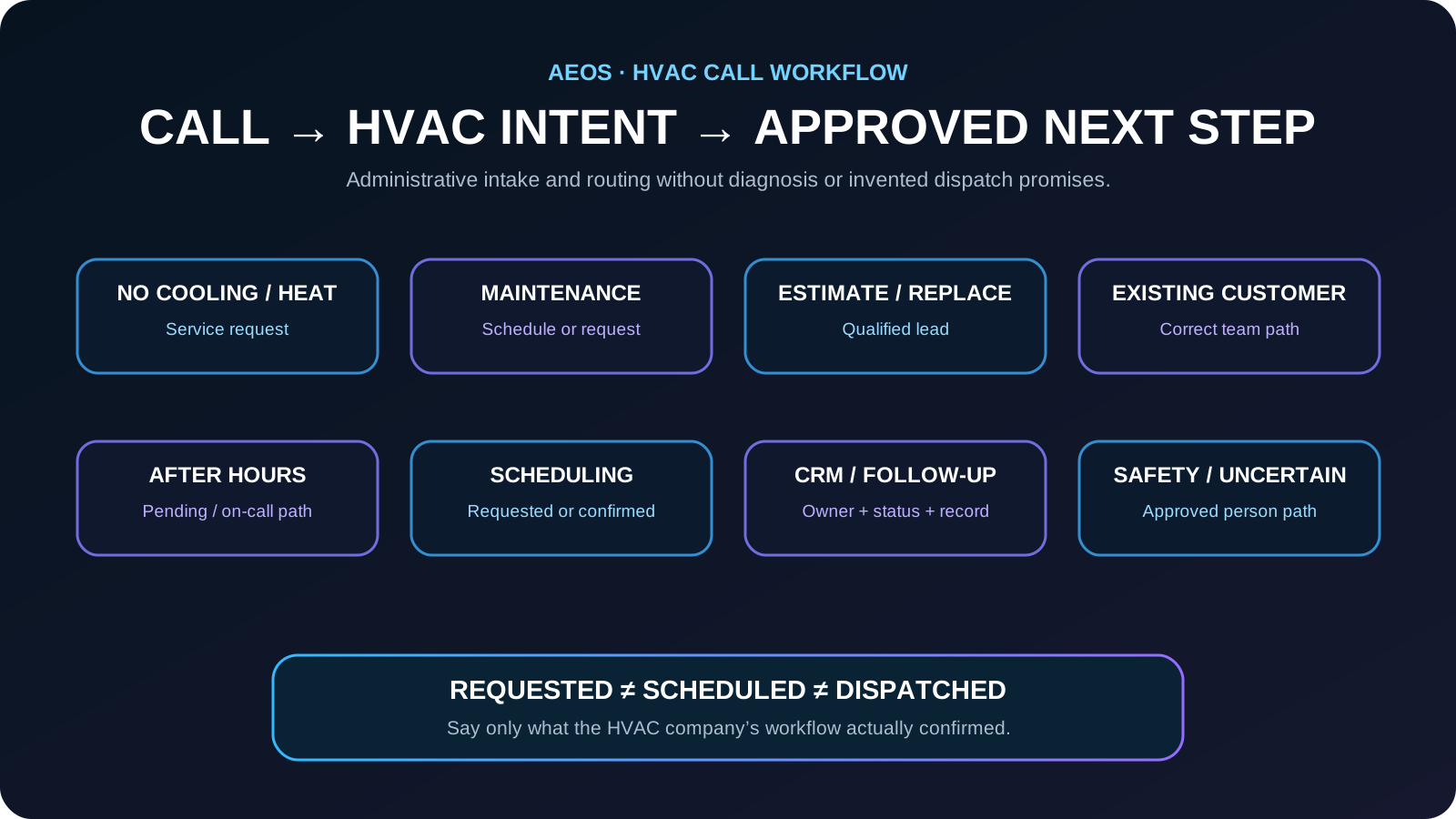
HVAC call map: route each caller to the right next step
Classify the caller’s intent before asking a long list of intake questions. That keeps routine calls efficient and makes it easier to apply the correct scheduling, follow-up, or escalation rule.
- No cooling or no heat → capture the service request, location, plain-language symptoms, timing, and approved urgency factors.
- Maintenance → identify the requested service, customer status, location, and preferred timing.
- Replacement or estimate → collect the service address, equipment or project context that is readily available, contact information, and preferred next step.
- Existing customer → route warranty, appointment-change, status, billing, or other requests according to the company’s approved process.
- Front office already busy → use overflow handling so the request becomes a structured record instead of an incomplete voicemail.
- After hours → create the approved pending service, callback, or on-call workflow without inventing technician availability.
- Safety-sensitive or uncertain statement → stop the routine script and use the company’s written safety and person-escalation path.
The goal is not to decide what is technically wrong. The goal is to get the right administrative facts to the right owner with the right status.
Keep scheduling, on-call notification, and dispatch status separate
A common failure is turning a captured request into a promise. The receptionist should distinguish what the caller requested from what the HVAC company has actually confirmed.
- Requested: the caller supplied a preferred time but nothing is confirmed.
- Pending review: the request has been recorded for staff or dispatch review.
- Scheduled: an authorized scheduling workflow confirmed a specific appointment.
- On-call alerted: the approved contact was notified, but technician assignment or arrival may still be pending.
- Dispatched: use this status only when the company’s actual dispatch workflow confirms it.
- Arrival time: never invent or estimate one unless the authorized system provides a confirmed window.
A truthful pending request is better than a confident dispatch promise the company never made.
Calls the HVAC workflow can handle
A well-defined first version can cover service calls, maintenance requests, estimate leads, and after-hours emergencies. The system should distinguish new opportunities from existing-customer requests, vendor calls, employment inquiries, spam, and situations that require a person.
- Answer approved questions about hours, locations, and service availability
- Capture complete contact and request details
- Apply service-area, schedule, or policy rules
- Create an appointment request or qualified lead
- Send a confirmation or next-step text
- Transfer or alert staff when an escalation rule is met
Information to collect
- Caller name and callback number
- Service address and service area check
- Cooling, heating, or indoor-air issue
- System status and basic symptoms
- Urgency and safety indicators
- Customer status and preferred appointment window
Calls that should escalate
The receptionist should not improvise through high-risk or policy-sensitive situations. It should give the approved safety or handoff language and route the caller according to the business rule.
- Gas smell, smoke, fire, or immediate danger
- No heat during dangerous conditions
- Water near electrical equipment
- Requests requiring licensed technical advice
A practical conversation flow
- Greet the caller and identify the business.
- Ask the reason for the call and classify the intent.
- Collect only the information required for that intent.
- Apply location, availability, urgency, and policy rules.
- Complete the permitted action or create a pending request.
- Repeat the next step and send confirmation when enabled.
- Record the result for staff review and follow-up.
Metrics to review after launch
- Calls answered and completed
- Qualified leads or appointment requests
- Missing or inaccurate intake fields
- Correct and incorrect escalations
- Caller requests to reach a person
- Time from call to staff action
- Revenue or bookings connected to handled calls
Start with the two or three HVAC call outcomes that occur most often. Reliability matters more than launching every possible workflow at once.
Example: “My AC stopped working”
A homeowner says the system stopped cooling and asks for service today.
The AI confirms the service address, callback number, equipment type if known, plain-language symptoms, when the issue began, access notes, and the company’s approved urgency factors. It then creates a pending service request, confirmed appointment, or on-call notification only according to the configured workflow.
The HVAC team receives a structured service record with the correct status and owner, while the caller hears what is actually confirmed and what still requires team action.
HVAC customer-conversation knowledge graph
This map defines the customer language, required facts, approved workflow, intended outcomes, and guardrails AEOS should understand for this industry.
Common problems
- no cooling
- no heat
- system not starting
- water near equipment
- unusual noise or smell
- maintenance request
- replacement estimate
What callers say
- My AC stopped working
- The house is not cooling
- The furnace will not turn on
- There is water by the unit
- I need service today
Information to capture
- caller name
- callback number
- service address
- equipment type if known
- problem description
- when it began
- approved urgency factors
- access notes
- preferred timing
AI workflow
- identify intent
- collect required facts
- apply approved urgency rules
- request or schedule service
- notify dispatcher or on-call technician
- store structured record
Business outcomes
- complete service request
- correct on-call escalation
- scheduled or requested appointment
- qualified replacement lead
Guardrails
- no diagnosis
- no invented arrival time
- no unsupported emergency promise
- human escalation for safety or uncertainty
Frequently asked questions
Can an AI receptionist book HVAC appointments?
It can book or request appointments when connected to the scheduling process and given clear rules for availability, duration, approval, and exceptions.
What happens when the caller asks something the AI cannot answer?
The workflow should acknowledge the limit, capture the request, and transfer or queue a callback rather than guessing.
Can the business change the script later?
Yes. Business hours, offers, questions, routing, and escalation rules should be maintained as controlled configuration and reviewed whenever operations change.
Can an HVAC AI receptionist handle after-hours calls?
Yes, when the HVAC company has defined the closed-hours workflow. It can capture the approved intake, create a pending service or callback request, notify the configured on-call path, and repeat the actual status. It should not promise emergency availability or a technician arrival time unless that has been confirmed.
Can an AI receptionist dispatch an HVAC technician?
Only when the company has an authorized and tested dispatch workflow that confirms the action. Otherwise the AI should say the request is pending, scheduled, or sent to the approved on-call or dispatch path rather than claiming a technician has been dispatched.
How to verify this answer in your own business
Evaluate the HVAC workflow by complete service-request capture, correct status, correct routing, safe escalation, and whether the team can continue the work without asking the caller to repeat the intake.
- complete service-request rate
- correct service-area routing
- correct appointment or pending-request status
- correct on-call or person escalation
- staff correction time
- caller repeat-information rate
- time from call to team ownership
Test normal service calls, maintenance, estimates, existing-customer requests, after-hours calls, ambiguous statements, safety-sensitive statements, requests for a person, and unavailable appointment times. Inspect the final CRM, scheduling, callback, or on-call record and verify that the status matches what actually happened.
Evidence policy: this page does not invent a universal conversion rate. Results depend on call demand, workflow quality, staff response, and implementation.
See how AEOS connects customer conversations to business actions.
Explore AEOS by Orca Charts for AI receptionist, scheduling, CRM, follow-up, business Q&A, live transfers, and team workflows for Industry Guides.