How can an AI receptionist help a plumbing company handle service calls?
A plumbing AI receptionist can handle approved administrative workflows for leaks, drain backups, water-heater issues, fixture problems, estimate leads, existing-customer requests, scheduling, overflow, and after-hours calls. It can collect the caller’s contact information, service address, affected area, whether water is actively flowing, access details, property context, preferred timing, and business-approved urgency or safety indicators; then create the configured next step or hand the call to the correct person. It should not diagnose the plumbing problem, give unapproved repair or safety instructions, quote prices the company has not authorized, or guarantee a plumber arrival time or dispatch status that has not actually been confirmed.
What matters most
- Separate leaks, backups, water-heater issues, fixtures, estimates, existing-customer requests, and after-hours calls.
- Capture contact information, service address, affected area, active-water status, access notes, property context, timing, and approved urgency factors.
- Use only the plumbing company’s configured service-area, scheduling, after-hours, price, and escalation rules.
- Distinguish captured, pending, priority callback, on-call alerted, scheduled, and dispatched statuses.
- Do not diagnose the cause, give unapproved repair instructions, or guarantee a plumber arrival.
- Measure complete intake, correct routing, status accuracy, staff correction time, and completed next steps.
AI Receptionist for Plumbing Companies: Calls, Scheduling & After-Hours Intake (2026)
Plumbing phone calls range from routine estimate requests to active leaks and safety-sensitive situations. A good receptionist workflow should identify the call type first, then collect only the information needed for that administrative path.
The AI’s role is not to decide why the leak exists or how to repair it. It should capture the caller’s facts, apply the plumbing company’s approved service-area, scheduling, after-hours, and escalation rules, and create a structured record for the person or queue that owns the next step.
Status language matters. A request can be captured, pending review, scheduled, sent to an on-call contact, or confirmed as dispatched. Those states should never be blurred into a promise that a plumber is on the way unless the company’s actual workflow confirms it.
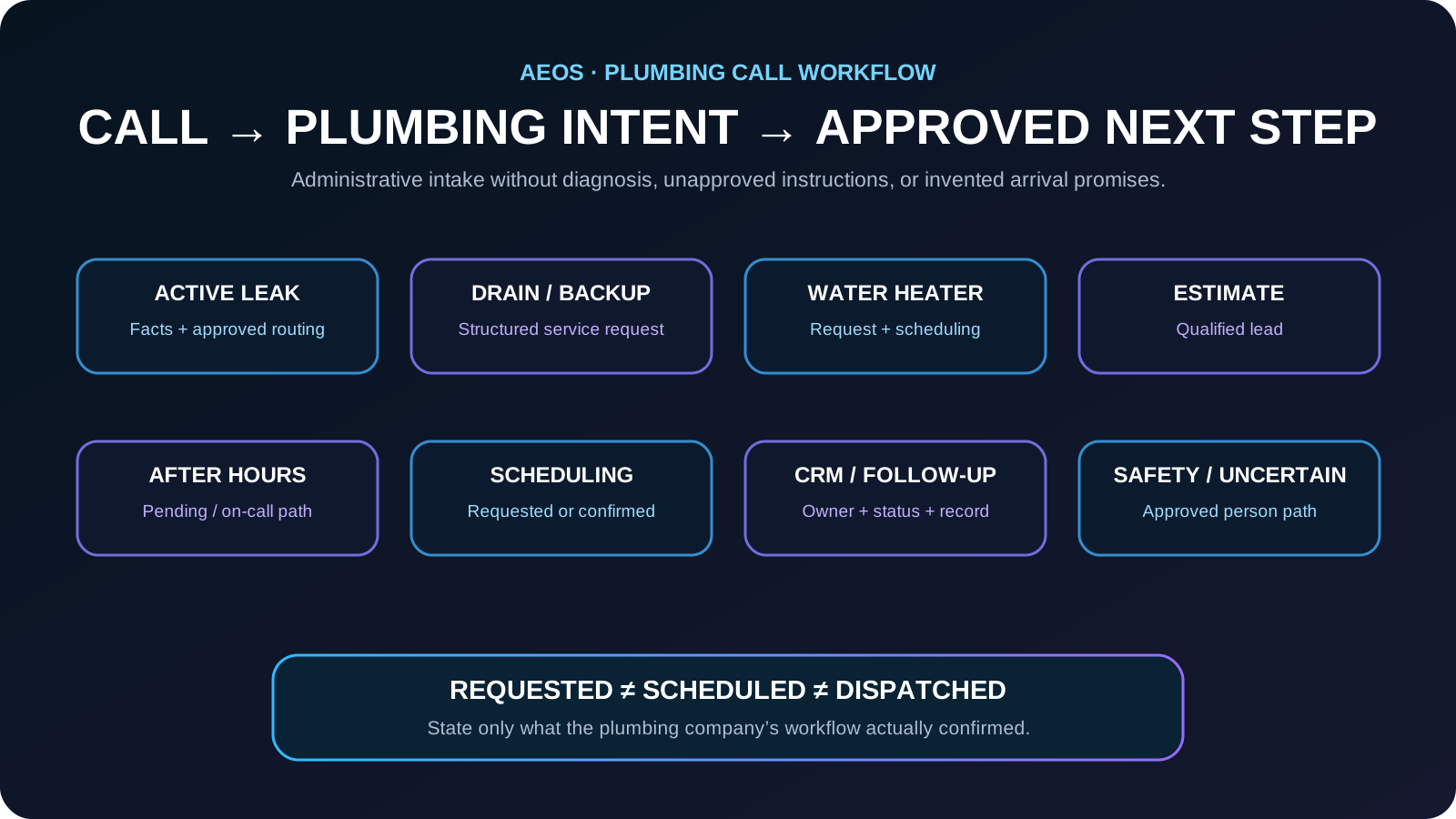
Plumbing call map: route each request to the right next step
Classify the caller’s intent before collecting a long intake form. That keeps routine calls efficient and lets urgent or safety-sensitive statements move into the company’s approved escalation path.
- Active leak or overflowing fixture → collect location, affected area, active-water status, access, contact details, and approved urgency indicators.
- Drain or sewer concern → capture the caller’s description, location, property context, timing, and the company’s approved routing facts.
- No hot water or water-heater issue → identify the service request and gather only the administrative equipment context the business requires.
- Fixture or routine repair → create the approved service or appointment request.
- Estimate or replacement → collect the project need, service address, contact information, and preferred next step.
- Existing customer → route appointment changes, warranty, status, billing, or job-related requests according to the company’s process.
- After hours → create the approved pending request, callback, or on-call notification without guaranteeing arrival.
- Safety-sensitive or uncertain statement → stop the routine script and use the company’s written person or safety-escalation path.
The goal is to capture the caller’s facts and create the right next action—not to diagnose the plumbing problem.
Keep urgent, on-call, scheduled, and dispatched statuses separate
An urgent request does not automatically mean a plumber has been assigned. The receptionist should repeat only the status the business’s workflow actually confirms.
- Captured: the plumbing request exists.
- Pending review: the request is waiting for team or dispatch review.
- Priority callback: the company has created an elevated callback path, but service is not necessarily confirmed.
- On-call alerted: the configured contact received the notification.
- Scheduled: an authorized scheduling workflow confirmed a specific appointment.
- Dispatched: use this status only when the company’s actual dispatch workflow confirms assignment.
- Arrival time: state it only when an authorized system or team member provides a confirmed window.
“Can someone come tonight?” is a customer request, not proof that service tonight has been confirmed.
Calls the plumbing workflow can handle
A well-defined first version can cover leaks, clogs, water-heater issues, estimates, and urgent dispatch requests. The system should distinguish new opportunities from existing-customer requests, vendor calls, employment inquiries, spam, and situations that require a person.
- Answer approved questions about hours, locations, and service availability
- Capture complete contact and request details
- Apply service-area, schedule, or policy rules
- Create an appointment request or qualified lead
- Send a confirmation or next-step text
- Transfer or alert staff when an escalation rule is met
Information to collect
- Caller name and callback number
- Property address and service area
- Type and location of plumbing issue
- Active water flow or shutoff status
- Property type and access notes
- Urgency and preferred service window
Calls that should escalate
The receptionist should not improvise through high-risk or policy-sensitive situations. It should give the approved safety or handoff language and route the caller according to the business rule.
- Flooding or uncontrolled water
- Sewage backup
- Gas-related requests
- Electrical danger near standing water
A practical conversation flow
- Greet the caller and identify the business.
- Ask the reason for the call and classify the intent.
- Collect only the information required for that intent.
- Apply location, availability, urgency, and policy rules.
- Complete the permitted action or create a pending request.
- Repeat the next step and send confirmation when enabled.
- Record the result for staff review and follow-up.
Metrics to review after launch
- Calls answered and completed
- Qualified leads or appointment requests
- Missing or inaccurate intake fields
- Correct and incorrect escalations
- Caller requests to reach a person
- Time from call to staff action
- Revenue or bookings connected to handled calls
Start with the two or three plumbing call outcomes that occur most often. Reliability matters more than launching every possible workflow at once.
Example: an active leak after hours
A customer reports water leaking under a sink and asks whether someone can come tonight.
The AI confirms the service address, callback number, where the caller sees water, whether water is actively flowing, access details, property context, and the company’s approved urgency or safety indicators. It then follows the configured after-hours path, such as a pending service request, priority callback, or on-call notification.
The plumbing team receives a structured request with the correct status and owner. The caller hears whether service is confirmed or still pending without being promised an unconfirmed dispatch or arrival time.
Plumbing customer-conversation knowledge graph
This map defines the customer language, required facts, approved workflow, intended outcomes, and guardrails AEOS should understand for this industry.
Common problems
- active leak
- drain backup
- no hot water
- water-heater issue
- fixture problem
- sewer concern
- estimate request
What callers say
- Water is leaking
- The drain is backing up
- We have no hot water
- The toilet is overflowing
- Can someone come tonight?
Information to capture
- caller name
- callback number
- service address
- affected area
- whether water is active
- access details
- property type
- preferred timing
AI workflow
- identify problem class
- collect location and active-condition facts
- use approved safety language
- apply emergency rule
- request or schedule service
- notify on-call team
Business outcomes
- complete service request
- safe escalation
- scheduled visit request
- qualified estimate lead
Guardrails
- no diagnosis
- no unapproved price quote
- no guaranteed arrival
- no unsafe repair instructions
Frequently asked questions
Can an AI receptionist book plumbing appointments?
It can book or request appointments when connected to the scheduling process and given clear rules for availability, duration, approval, and exceptions.
What happens when the caller asks something the AI cannot answer?
The workflow should acknowledge the limit, capture the request, and transfer or queue a callback rather than guessing.
Can the business change the script later?
Yes. Business hours, offers, questions, routing, and escalation rules should be maintained as controlled configuration and reviewed whenever operations change.
Can a plumbing AI receptionist handle after-hours leak calls?
Yes, when the plumbing company has defined the after-hours workflow. It can collect the approved intake, use the company’s written safety language, create a pending or priority callback request, notify the configured on-call path, and repeat the actual status without guaranteeing a plumber arrival.
Can an AI receptionist tell a plumbing caller to shut off the water?
Only when that exact instruction is part of the plumbing company’s approved script for the specific workflow. The AI should not improvise repair or safety instructions. It can ask about active-water or shutoff status when that information is part of the approved intake.
How to verify this answer in your own business
Evaluate the plumbing workflow by complete intake, correct use of approved safety and escalation rules, truthful service status, and whether the team can continue the work without unnecessary clarification.
- complete service-request rate
- service-address and contact completion
- correct active-water or affected-area capture
- correct escalation or on-call routing
- status accuracy
- staff correction time
- caller repeat-information rate
Test routine repairs, estimates, active leaks, drain backups, water-heater calls, after-hours requests, safety-sensitive statements, incomplete information, requests for a person, and unavailable appointment times. Inspect the resulting service, callback, scheduling, CRM, or on-call record and verify that no diagnosis, unapproved instruction, unapproved price, or unconfirmed arrival promise was made.
Evidence policy: this page does not invent a universal conversion rate. Results depend on call demand, workflow quality, staff response, and implementation.
See how AEOS connects customer conversations to business actions.
Explore AEOS by Orca Charts for AI receptionist, scheduling, CRM, follow-up, business Q&A, live transfers, and team workflows for Industry Guides.