What information should an AI receptionist collect from an HVAC emergency caller?
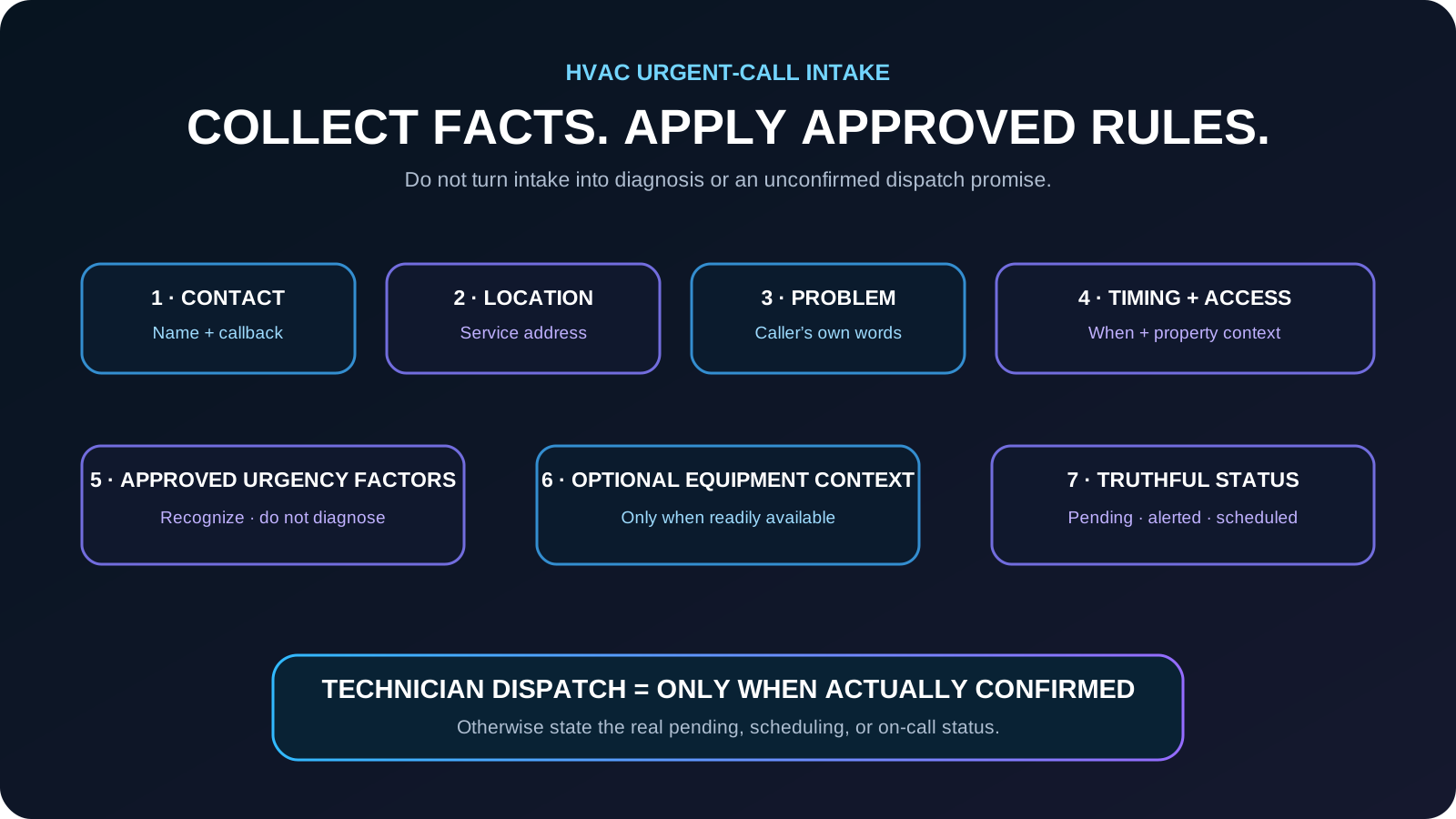
For an HVAC urgent or emergency service call, an AI receptionist should first collect the caller’s name and callback number, exact service address, plain-language description of the problem, when it began, customer status, access notes, and any business-approved urgency or safety indicators. Equipment type, make, model, age, or recent repair history can be collected when readily available and useful, but those details should not delay the company’s approved escalation path. The AI should not diagnose the equipment, decide technical severity on its own, give unapproved repair or safety instructions, promise emergency availability, or say a technician is dispatched unless the company’s actual workflow confirms it.
What matters most
- Collect caller identity and service location before optional equipment detail.
- Capture the problem in the caller’s words and apply only business-approved urgency indicators.
- Treat equipment make, model, age, and repair history as optional context when available.
- Do not diagnose equipment or give unapproved technical or safety instructions.
- Do not promise technician availability, dispatch, or arrival time unless the actual workflow confirms it.
- Measure completeness, correct routing, status accuracy, and follow-up clarification.
- Record caller-reported conditions and unknowns without converting them into diagnosis or technical severity.
HVAC Emergency Calls: What Information Should an AI Receptionist Collect? (2026)
An urgent HVAC call needs a fast, structured administrative handoff—not a remote diagnosis. The receptionist’s job is to capture the facts the HVAC company requires and recognize when the business’s written safety or escalation rule applies.
The order of questions matters. Contact and location information should come first, followed by a plain-language description, timing, access notes, and the approved urgency indicators. Equipment details can add context, but they should not become a gate that delays escalation when the workflow says to hand the call off.
The final record should also preserve status. “Request captured,” “on-call contact alerted,” “appointment scheduled,” and “technician dispatched” mean different things and should only be used when the underlying workflow confirms them.
Information to collect first on an HVAC urgent call
Collect the minimum facts needed to identify the caller, locate the job, understand the request in the caller’s own words, and apply the HVAC company’s approved routing rule.
- Caller name and callback number
- Exact service address and unit or access location when relevant
- Plain-language description of what the caller is experiencing
- When the issue began and whether the condition changed recently
- New or existing customer status when that changes the workflow
- Access notes, gate information, tenant or property-management context when required
- Preferred timing or callback window when appropriate
- Business-approved urgency or safety indicators
Capture what the caller reports. Do not turn those statements into a technical diagnosis.
Equipment details are useful context, not a reason to delay escalation
Equipment type, make, model, approximate age, or recent service history may help the team understand the request, but callers may not know those details and the AI cannot know what parts or repair will be required.
- Ask equipment type when it helps distinguish the workflow.
- Collect make, model, or age only when readily available and useful to the company.
- Do not require equipment identifiers before following an approved urgent-call escalation.
- Do not tell the caller which component failed or what repair is needed.
- Do not promise that the collected equipment information guarantees a particular tool, part, repair, or first-visit resolution.
Use the HVAC company’s written safety and escalation language
Statements involving smoke, fire, gas odor, electrical danger, water near electrical equipment, severe temperature conditions, or other safety-sensitive situations should follow the HVAC company’s verified safety and person-escalation policy. The AI should not improvise technical or emergency instructions beyond that approved language.
- Recognize the phrases or conditions the company has configured as escalation triggers.
- Stop routine scheduling questions when the approved policy requires an immediate person or safety path.
- Use only the written language the company has approved for that condition.
- Preserve the caller’s words in the record without converting them into a diagnosis.
- Flag uncertainty for person review rather than guessing.
Keep service status truthful: captured, pending, alerted, scheduled, or dispatched
Urgency does not automatically mean a technician has been assigned. The receptionist should repeat only what the company’s workflow has actually confirmed.
- Captured: the service request exists.
- Pending: the request is waiting for team or dispatch review.
- On-call alerted: the configured contact received the notification.
- Scheduled: an authorized scheduling workflow confirmed a time.
- Dispatched: the company’s actual dispatch system or authorized team confirmed assignment.
- Arrival window: state it only when a verified source provides it.
Never convert “urgent” into “technician is on the way” unless the company actually confirmed that status.
Separate caller-reported conditions from technical conclusions
The intake record should preserve what the caller says without converting it into a diagnosis, severity decision, or repair recommendation. The same caller phrase can lead to different technical findings once a qualified HVAC professional evaluates the equipment.
Business-approved urgency indicators can change the routing path, but they still do not authorize the AI to declare the cause of the problem or tell the caller what repair is required.
- Caller reports “the house is not cooling” → record that statement as the service symptom.
- Caller reports “there is water near the unit” → preserve the caller’s wording and apply only the company’s configured safety or escalation rule.
- Caller reports an unusual smell, noise, smoke, gas odor, or electrical concern → use only the company’s written safety and person-escalation language.
- An urgency trigger can change who receives the call without becoming a technical diagnosis.
- Unknown facts should remain unknown rather than being filled in from assumptions.
- Technical cause, repair scope, part requirement, equipment condition, and road-to-repair decisions remain with qualified HVAC personnel.
CALLER REPORT ≠ DIAGNOSIS. URGENCY TRIGGER ≠ TECHNICAL SEVERITY DECISION.
Use a handoff-first path when information is incomplete or a person is needed
Urgent callers may not know the equipment model, may be unable to inspect the unit, may ask directly for a person, or may describe a situation that does not fit the configured workflow. The receptionist should not block the handoff while trying to complete optional intake.
The system should preserve the facts already collected, mark unknown fields as unknown, and move to the HVAC company’s approved person, on-call, callback, or safety-sensitive path.
- Do not require optional equipment details before an approved urgent handoff.
- Honor a clear request for a person without continuing unnecessary qualification.
- Carry the caller name, callback number, service address, reported condition, timing, access notes, and relevant approved urgency indicators into the handoff when available.
- If a live transfer is attempted, distinguish attempted, accepted, and connected states.
- If a callback or on-call notification is created, describe only the state the underlying workflow actually confirms.
- If the configured rule does not clearly cover the situation, route uncertainty to a person rather than improvising.
INCOMPLETE INTAKE ≠ FAILED INTAKE. HANDOFF CAN BE THE CORRECT COMPLETED NEXT STEP.
How to measure urgent-call intake quality
The best measure is whether the HVAC team receives a complete, correctly routed record and whether the caller hears an accurate next step.
- Contact and service-address completion
- Plain-language problem description captured
- Approved urgency indicators recorded correctly
- Correct person, on-call, or dispatch routing
- Incorrect escalation rate
- Requests requiring follow-up clarification
- Status corrections after the automated call
- Time from call completion to team ownership
Example: after-hours no-cooling request with an approved escalation check
A homeowner calls after hours and says the air conditioner is running but the house is not cooling.
The AI confirms the name, callback number, service address, plain-language symptoms, when the issue began, access notes, and the HVAC company’s approved urgency factors. It creates the configured pending service request or on-call notification and repeats the actual status.
The HVAC team receives a structured record. The caller knows whether the request is pending, scheduled, or sent to the on-call path without being promised an unconfirmed dispatch or arrival time.
HVAC customer-conversation knowledge graph
This map defines the customer language, required facts, approved workflow, intended outcomes, and guardrails AEOS should understand for this industry.
Common problems
- no cooling
- no heat
- system not starting
- water near equipment
- unusual noise or smell
- maintenance request
- replacement estimate
What callers say
- My AC stopped working
- The house is not cooling
- The furnace will not turn on
- There is water by the unit
- I need service today
Information to capture
- caller name
- callback number
- service address
- equipment type if known
- problem description
- when it began
- approved urgency factors
- access notes
- preferred timing
AI workflow
- identify intent
- collect required facts
- apply approved urgency rules
- request or schedule service
- notify dispatcher or on-call technician
- store structured record
Business outcomes
- complete service request
- correct on-call escalation
- scheduled or requested appointment
- qualified replacement lead
Guardrails
- no diagnosis
- no invented arrival time
- no unsupported emergency promise
- human escalation for safety or uncertainty
Frequently asked questions
Can an AI receptionist provide troubleshooting advice during an HVAC emergency call?
It should not diagnose equipment or improvise technical repair advice. It should follow only the HVAC company’s approved administrative, safety, and escalation language and hand technical questions to a qualified person.
Does the caller need to know the HVAC make, model, and age?
No. Those details may be useful context when readily available, but they should not be required before the business’s approved urgent-call escalation. The caller’s contact information, service address, problem description, timing, and configured urgency factors are usually more important to the initial handoff.
What if the caller cannot provide complete information?
Collect what the caller can provide, preserve which fields are unknown, and use the company’s approved pending, callback, or escalation path. Do not invent missing facts.
Can the AI say a technician has been dispatched?
Only if an authorized company workflow has actually confirmed dispatch. Otherwise use the truthful status, such as request captured, pending review, appointment scheduled, or on-call contact alerted.
What should happen when an HVAC caller reports a safety-sensitive condition?
The AI should stop the normal intake flow when the HVAC company’s written policy requires it and use the approved safety or person-escalation path. It should not improvise diagnosis or technical emergency instructions.
How to verify this answer in your own business
Evaluate urgent HVAC intake by completeness, correct use of approved escalation rules, truthful status, and whether the team receives enough information to take over without avoidable clarification calls.
- contact and address completion
- problem-description completeness
- approved urgency-factor accuracy
- correct escalation routing
- status accuracy
- follow-up clarification rate
- staff correction time
Test representative no-cooling, no-heat, after-hours, ambiguous, incomplete-information, safety-sensitive, and person-requested scenarios against the HVAC company’s written policies. Inspect the resulting service, callback, scheduling, on-call, or dispatch record and verify that no diagnosis or unconfirmed dispatch promise was made.
Evidence policy: this page does not invent a universal conversion rate. Results depend on call demand, workflow quality, staff response, and implementation.
See how AEOS connects customer conversations to business actions.
Explore AEOS by Orca Charts for AI receptionist, scheduling, CRM, follow-up, business Q&A, live transfers, and team workflows for Industry Guides.